ZADAX Marketplace is a secure marketplace for digital technical products created for engineers, architects, developers, and technical professionals. You can discover plugins, scripts, templates, spreadsheets, software tools, and similar assets, add suitable products to your cart, and get free products through the current beta checkout flow.
This guide is written for everyone, including first-time users. You do not need technical knowledge to follow it. The goal is to explain what to check, where to click, and what to expect during the product acquisition process.
When you visit ZADAX, you can discover products from the homepage, marketplace listings, category pages, or search area. The platform supports both Turkish and English interfaces, so page text and links may appear according to your language preference.
When searching for a product, you can:
ZADAX is designed not only to list products, but also to help technical users find the right tool in a secure and organized way. Before getting or buying a product, it is always a good idea to review the details carefully.
The product detail page is the most important place to review before making a decision. It explains what the product does, how it is delivered, and which conditions may apply.
Pay special attention to the following sections:
The description explains what problem the product solves and who it is for. If the product is a technical tool, this section usually describes the workflow or use case.
Some products are designed for a specific software, software version, or technical environment. For example, a plugin may only work with a certain program or version. Before getting the product, make sure it is compatible with your setup.
A product may be delivered as a secure downloadable file through ZADAX. Some products may also provide a GitHub or external resource link. Platform-managed product files are not intended to be shared as permanent public direct links; downloads are served through a secure authorization flow for eligible users.
Check whether the product is free or paid. During the ZADAX beta period, the checkout flow currently focuses on free products. Paid products may be visible or may be added to the cart, but payment completion may be disabled or limited during beta.
The developer information helps you understand who published the product and what kind of support or update expectations may exist. If available, review the developer profile, product notes, update details, and support instructions.
Some products may require acceptance of an EULA or another agreement. This helps clarify the conditions under which you are allowed to use the product.
After reviewing the product details, you can add the product to your cart if you want to get it.
The usual flow is:
Adding a product to your cart does not mean you have downloaded it yet. You still need to review your cart, accept any required agreements, and complete the checkout process.
The cart page is where you make a final check before completing the process. This step is important to avoid selecting the wrong product or being blocked by paid-product limitations during beta.
In your cart, check:
During beta, checkout can only be completed for free products. If your cart contains a paid product, the system may prevent checkout completion. This is not necessarily an error; it is the current beta business rule. Paid checkout can be activated later when the payment infrastructure is ready.
The current ZADAX beta checkout rule is simple: free products can be acquired, while paid-product payment completion may be disabled or limited.
To get a free product:
If you cannot continue with a paid product, or if checkout is blocked, the reason may be that paid checkout is not active during beta. You can follow the product page or contact the developer or platform support for more information.
EULA usually means "End User License Agreement." It explains what rights you have, what you can do with the product, and which limitations apply.
On ZADAX, some products or checkout flows may require agreement acceptance. This is used to:
You should read the agreement before accepting it. When you accept, the system may associate that acceptance with your account, the agreement version, and the related transaction.
If your cart is valid and you have accepted the required agreements, you can complete the order. For free products, the system usually completes the order without taking a payment.
When the order is completed:
If the order does not complete, check whether your cart contains a paid product, whether you are logged in, and whether you accepted all required agreements.
Products you bought or got for free are usually available from the library or orders section inside your user account.
The general download steps are:
For security reasons, ZADAX product files may not be shared through permanent public direct file links. The download happens after the system verifies your order status and access rights. This protects both the developers' work and the user's access to the correct file.
ZADAX is designed with secure file access in mind. Platform-managed product files should not be treated as public links that anyone can guess and download.
Security rules may include:
As a user, you can also stay safe by following these practices:
First, check whether you are logged in. The product may have been unpublished, may be waiting for approval, or may not be available for access. Refresh the page and try again.
Your cart may contain a paid product. During beta, free products can be completed, while paid products may be blocked from payment checkout. Review your cart and try again with free products only.
This is normal. You may need to accept the product usage terms. Read the agreement and accept it if you agree with the terms.
Your order may not be completed, or you may be logged in with a different account. Check your library and orders section.
The system may be checking your order status, acquisition record, or access permission. If the issue continues, contact support with the product name, order information, and the error message you see.
Check the compatibility information on the product detail page. If you are not sure, read the developer notes or ask through the available support channels.
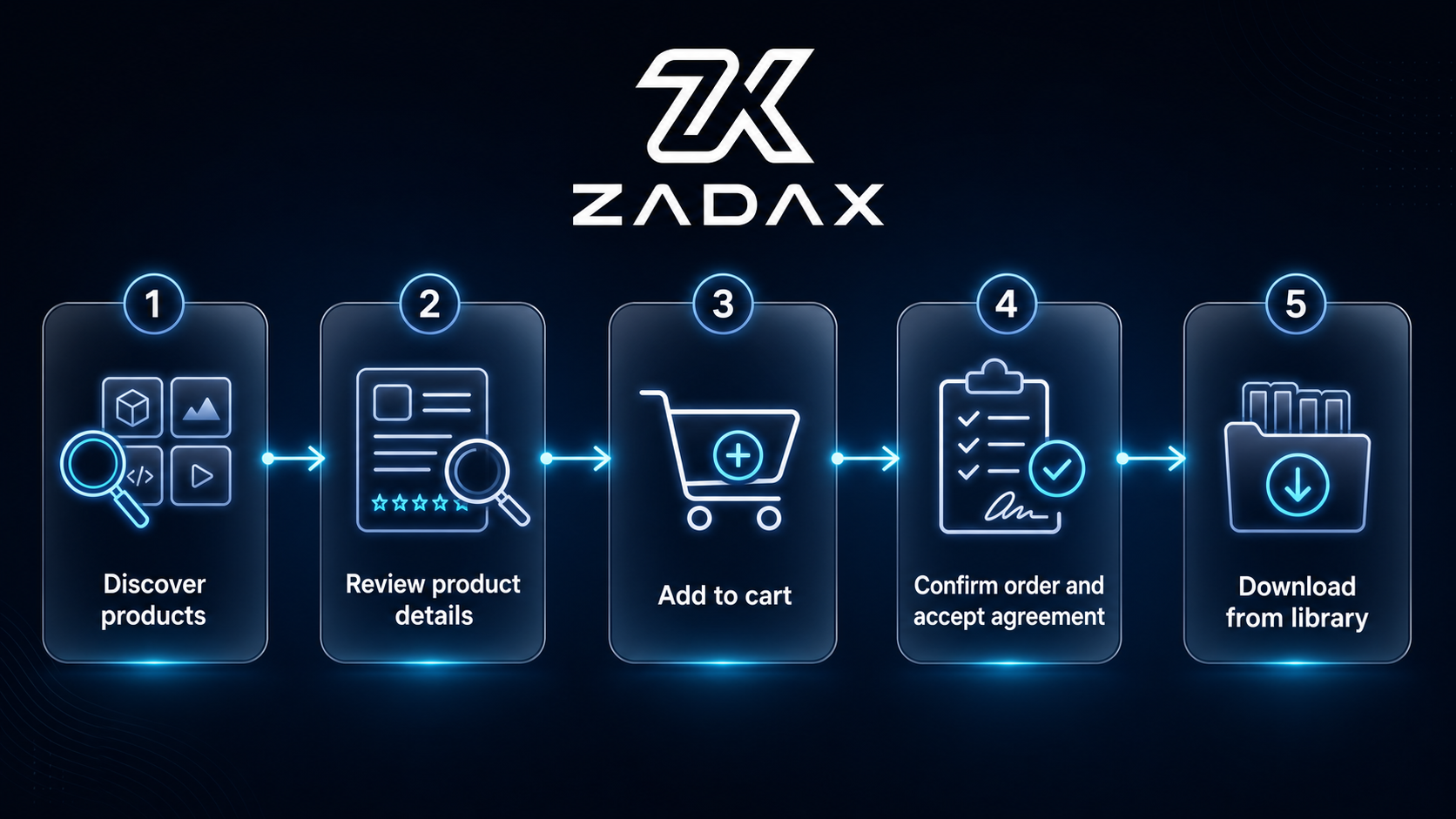
Getting a product on ZADAX Marketplace involves discovering the product, reviewing its details, adding it to the cart, checking the cart, accepting agreements when required, completing the order, and downloading the product securely.
The most important beta-period rule is this: free products can be acquired through checkout, while paid-product payment completion may not be active yet. This rule helps the platform grow in a secure and controlled way.
To choose the right product, carefully read the description, compatibility details, and license terms. After the order is completed, you can access your products securely from your account library or orders area.